Best Practices for XML License Plate Data Handling

Best Practices for XML License Plate Data Handling
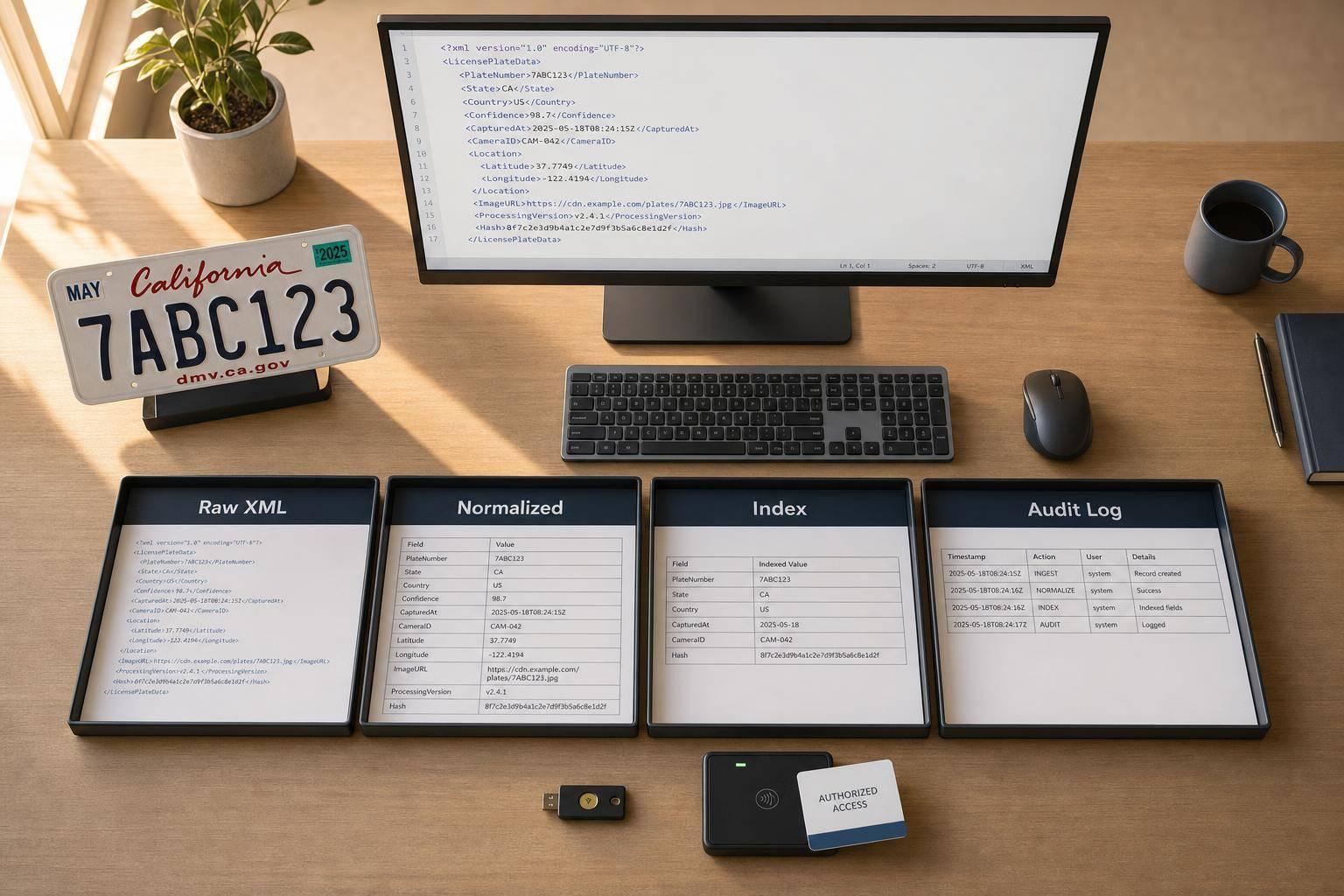
If your XML plate records are not standardized at intake, errors spread fast. My takeaway is simple: use one schema, validate before storage, keep both raw and normalized values, index the fields people search most, and lock access down with logs and encryption.
In plain terms, I’d treat this as a data-control issue, not just a format issue. At high volume - like the 362,755,413 DMV transactions Nlets processed in 2021 - small mistakes in timestamps, state codes, or plate text can turn into daily problems.
Here’s the short version:
- Use one XML contract with fixed element names, namespaces, and schema versioning
- Validate early: check XML structure, plate length, state codes, timestamps, and OCR confidence
- Normalize for search: keep the raw plate, but also store an uppercase, separator-free value like
7XER187 - Store for both search and audit: keep the source XML and index parsed fields
- Secure access: use RBAC, TLS, encryption at rest, and parser hardening
- Keep API enrichment separate: send only the plate and state or country, not the full XML
A few details matter more than most:
- U.S. plate strings outside the 2–8 character range should be rejected
- Timestamps should use ISO 8601 with time zone offsets
- Jurisdictions should use controlled two-letter codes like CA, DC, PR, and VI
- OCR mix-ups like O/0, B/8, and I/1 should trigger checks or review
- A hybrid storage model usually gives the best mix of search speed and audit traceability
Area What I’d do Schema Keep canonical field names, namespaces, and version tags Validation Check XML, plate rules, state codes, timestamps, and confidence bands Normalization Store raw plus normalized plate and mapped jurisdiction code Storage Save original XML and index normalized lookup fields Security Limit access, log every search, disable risky XML parser settings Enrichment Store decoded vehicle data in a linked record, separate from source XML
So if I had to boil the whole article down to one line, it would be this: make every record look the same before it enters your system, then keep the source intact while you search the normalized data.
XML License Plate Data Handling: End-to-End Best Practices
LPR Camera API Server for Software Development Integrations
sbb-itb-9525efd
XML schema design for stable license plate records
To get rid of mixed formats and duplicate parsing logic, use one XML contract for every plate record. Then map each incoming record to that format.
Define required fields and canonical element names
At a minimum, each record should include the plate string, jurisdiction, and capture timestamp or effective date. It also helps to keep source attribution, category, status, and extra metadata available for records that need more detail.
For naming, keep things predictable with canonical element names. NIEM components usually use UpperCamelCase, which helps keep large XML workflows consistent, and standard element names cut down on custom mapping [4]. One naming standard makes plate records easier to share across systems.
Field Recommended Element Notes Plate string nc:IdentificationID The alphanumeric plate value Jurisdiction nc:IdentificationJurisdiction Issuing authority or region Capture / effective date nc:IdentificationEffectiveDate Use ISO 8601 with timezone offsets Source system nc:IdentificationSourceText Device, organization, or system that generated the record Plate category nc:IdentificationCategoryText Plate type such as commercial or passenger Record status nc:IdentificationStatus Validity status at capture time XML ID / audit data s:id Unique identifier for audit trail and record linkage Schema version s:metadata Tracks schema version applied to the record
Store both a display label and a standard jurisdiction code. That way, user interfaces can show the right text while routing systems use the right code behind the scenes.
Use namespaces and versioning to preserve compatibility
Namespaces matter when plate data comes from more than one system or jurisdiction. Use a dedicated namespace for fields that aren't part of the base NIEM core, like confidence scores or image references. This lets the core record stay valid while still passing extra data downstream.
Change the version only when the schema changes. If fields need to change, add new elements instead of renaming or removing old ones. In plain English: add to the schema instead of breaking what already works.
Once the schema is stable, validate each incoming record before storage.
Validation and normalization before storage
Validation needs to happen before storage or any downstream use. If bad data gets in early, it can ripple through reports, routing rules, and API lookups later. That kind of mess is much easier to stop at the door than to clean up after the fact.
Validate plate patterns, metadata, and XML structure
Validation works best in layers.
Start with the structure. Make sure the XML is well-formed and schema-valid. Then move to the content itself: check plate length and allowed characters against the expected regional pattern. In U.S. workflows, any string outside the 2- to 8-character range should be rejected [1][2].
Jurisdiction codes should also come from a controlled list. In practice, that means using the standard two-letter abbreviations for U.S. states and territories, such as CA, DC, GU, PR, and VI [2][5].
For records coming from OCR systems, confidence scores can’t be treated as an afterthought. A simple three-band policy keeps decisions clear and consistent [1]:
Band Confidence Level Action Auto-accept High Store and process normally Review required Medium / ambiguous Flag for manual review Reject Low confidence or malformed XML Discard and trigger recapture
OCR mistakes tend to show up in familiar ways: O vs. 0, B vs. 8, and I vs. 1. These are common enough that your validation logic should check for them on purpose [1]. It also makes sense to flag any record that’s missing source, timestamp, or image reference for review.
Normalize plate strings and date-time values
Store both the raw capture value and a normalized search value. Don’t overwrite the original under any circumstances [1][6].
For plate strings, trim whitespace, remove separators like dashes or dots, and convert the result to uppercase [1][6]. So a raw value like "7XER 187" should become "7XER187" after normalization. For jurisdictions, map free-text input to the two-letter code. "California" should become "CA" [6].
Timestamps should be converted to ISO 8601 format with time zone offsets [1][4]. That keeps time data consistent across systems and avoids the usual confusion when records move between regions or services.
It’s also smart to review validation rules quarterly. Plate formats change, and camera conditions can shift over time, so rules that worked six months ago may start missing edge cases [6]. Once records are normalized, they should be stored in a model that keeps audit data intact and still supports fast search.
Storage, indexing, and query performance
Once records are validated and normalized, store the raw XML and query the normalized fields. That gives you the best of both worlds: the source record stays intact, while day-to-day lookups stay fast.
Use the normalized fields from the previous step to shape the storage layer.
Choose a storage model that supports search and audit
You’ve got three main options here: raw XML, parsed relational columns, or a hybrid setup.
Storage Approach Search Speed Storage Cost Auditability Best For Raw XML only Slow Higher Highest Legal compliance, rare audits Parsed relational Fastest Lowest Lower High-speed application queries Hybrid model Fast Medium High Scalable production pipelines
For high-volume feeds, a hybrid model usually makes the most sense: index the key fields, but keep the full XML for audit [7][8].
And there’s one detail that’s easy to miss. If you need to preserve the exact XML text, store the original XML in a text column, not just a native XML type. Native XML parsing can strip whitespace, and that can matter during audits [7][8].
Index the fields teams query most often
Start with the fields people search all the time:
- normalized plate number
- capture time
- source or camera ID
- issuing state
Index those first [1]. Then partition by date so recent queries run faster and older records can move into archive storage more cleanly [3][8].
It also helps to add deduplication keys early. That cuts down repeated scans and improves occupancy and visit counts [3].
After storage and indexing are stable, lock down access and integration points.
Security, retention, and controlled integration
Once XML plate records are stored, the next job is simple: control access and control data flow.
Apply encryption, logging, and role-based access
Use RBAC to limit license plate searches to documented DPPA-permissible uses. Every access should be logged with the user, purpose, time, and result.
Use TLS for data in transit. For sensitive data at rest, use field-level XML encryption. Then pair RBAC with audit logs so you can see who touched what, when, and why.
XML parser flaws can leak data or bring systems down. That’s why DTD processing should be disabled to block XML bomb attacks. In .NET, that means setting DtdProcessing = DtdProcessing.Prohibit and XmlResolver = null [9].
For day-to-day monitoring, log XML parsing errors as their own event type. Odd parsing failures can point to attempted injection or fuzzing attacks [9].
Connect XML workflows to decoding and vehicle data APIs
Keep enrichment separate from the source XML so audit trails stay clean. If enrichment is needed, send only the minimum plate data downstream.
For decoding, send only the normalized plate plus the required location code:
- For U.S., Australian, and Canadian requests, use
plateandstate - For most other countries, use
plateand the ISO 3166-1 alpha-2countrycode [5]
Never send the full XML document to an external API.
CarsXE provides license plate decoding support for more than 50 countries, and decoded responses can include make, model, year, and vin [5][10]. You can map those fields back into your internal XML schema as child elements, without copying the sensitive source record itself.
Store decoded fields in a separate enrichment record linked to the source XML. That way, audits can trace each change back to its source.
Conclusion: Build XML plate pipelines that stay accurate, searchable, and secure
XML license plate handling is a governance problem. Schema, validation, storage, access, and retention shape accuracy and auditability.
The process stays the same from end to end: use a stable schema, validate and normalize data before storage, index the fields you query most, and enforce role-based access with logging. Retention rules and access controls matter most when plate data is regulated or time-sensitive. And those controls only work if one owner keeps the pipeline current.
The last control comes down to day-to-day discipline. Assign a named owner to maintain validation rules and run quarterly checks for layout drift and capture-quality changes [1][6].
FAQs
Why keep both raw and normalized plate values?
Keeping both raw and normalized license plate values helps protect data integrity and traceability.
The raw value is the exact plate read that was captured. The normalized value is the cleaned, standardized version that downstream applications use.
That split matters more than it may seem at first. Keeping the original read makes room for audits, discrepancy checks, and debugging. If something looks off later, teams can go back to the source instead of guessing what changed.
Normalization also shouldn’t overwrite the source data. Once the raw value is replaced, the original context is gone. By storing both, you keep the source record intact while still giving other systems a consistent format to work with.
What should happen to low-confidence OCR reads?
Low-confidence OCR reads should follow a clear confidence policy, not one automated path. A simple banding system works well: auto-accept, review required, or reject and recapture.
When confidence is low, send the data to human confirmation or a manual review queue before it moves into downstream workflows. Regular audits of these exception queues can also show repeat causes of OCR errors, such as glare or debris.
When should XML plate data be enriched with API results?
Use CarsXE API to enrich XML license plate data when you need to turn raw plate records into fuller vehicle details, like specs, market value, or history.
This helps when you want to connect basic registration data to things like VIN, body style, engine setup, and vehicle history. It also makes it easier to standardize records across regional formats so you can analyze them in a more consistent way.
Related Blog Posts
- Study: OCR Accuracy in Vehicle Data Processing
- VIN Decoding vs. License Plate Recognition Security
- Ultimate Guide to License Plate Data Interoperability
- Cloud LPR Integration Tips for Developers