AI OCR for Vehicle Data: Multi-Language Support

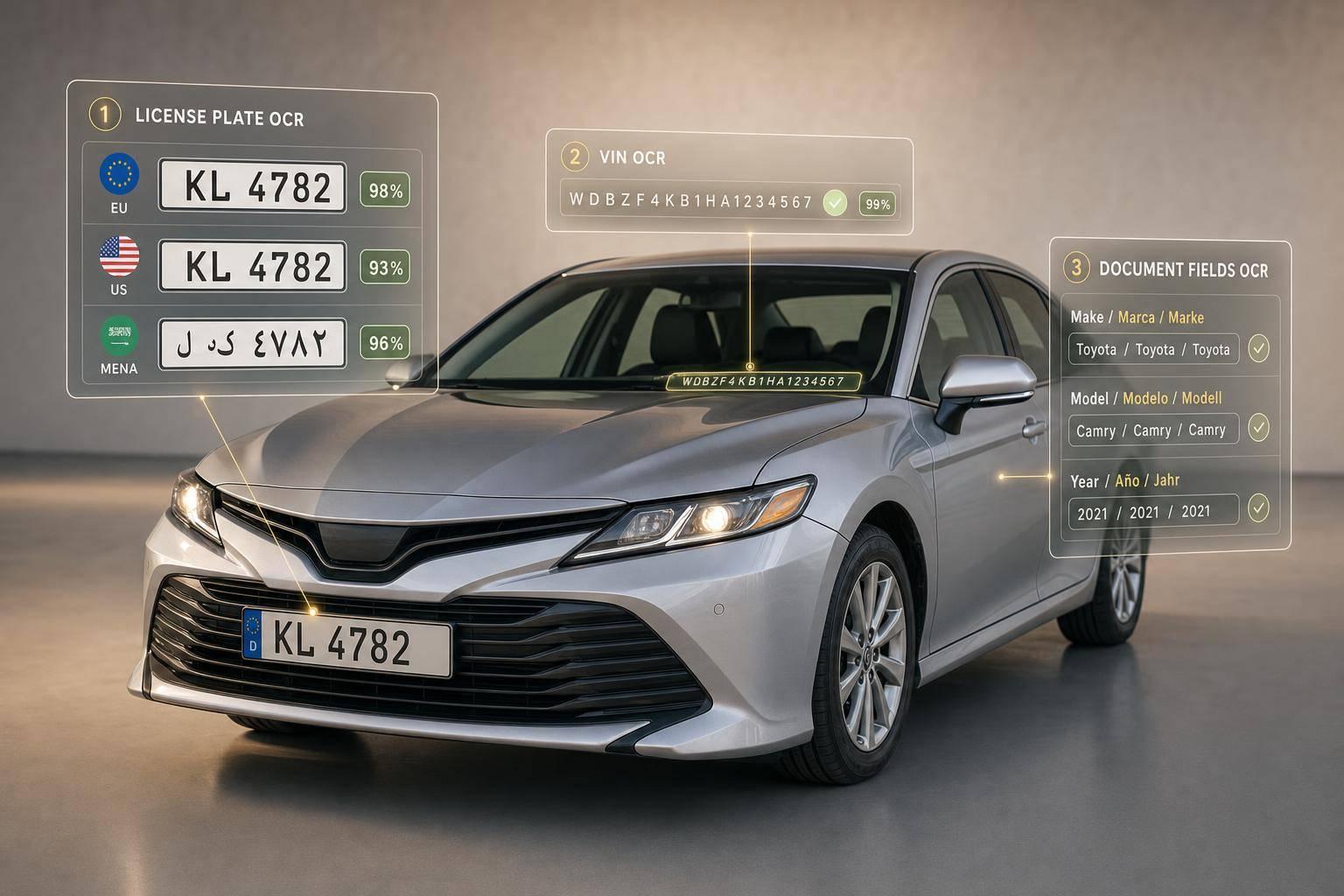
AI OCR for Vehicle Data: Multi-Language Support
If you read vehicle records from more than one country, English-only OCR will miss data, mix up fields, and send bad records downstream. I’d set up the workflow around four steps: read the image, pull the right fields, check them with local rules, and then send clean plate or VIN data into lookups.
Here’s the short version:
- Vehicle OCR has to read more than plates. It also needs to read VIN stickers, door labels, registrations, titles, permits, inspection forms, and invoices.
- Language support alone is not enough. The system also needs country and region rules for plate length, separators, line order, dates, and document fields.
- AI OCR beats fixed-template OCR when images are messy. That matters for glare, angled photos, wrinkles, dirt, shadows, and mixed scripts.
- Raw text is not the end goal. I need field mapping, normalization, and validation for items like plate number, VIN, date, and issuing region.
- Confidence scoring should drive routing. A simple policy works well: auto-accept above 0.90, review from 0.80 to 0.90, and recapture below 0.80.
- Plate OCR can be fast. The article cites about 117 to 226 ms per image for plate reads.
- Cross-checking cuts errors. I’d compare plate OCR, VIN OCR, and registration data before pushing anything into claims, fleet, tolling, or compliance systems.
- Audit trails matter. Keep both the original OCR text and the cleaned value.
A few points stand out to me.
First, multi-language vehicle OCR is less about reading every word and more about pulling the fields that matter. That means things like plate string, VIN, registration date, owner details, engine number, gross weight, and axle count.
Second, mixed-format records are common. A plate can combine local characters, Latin letters, and numbers in one line. A document can mix local labels with standard IDs. So field logic should match by meaning, not just by page position.
Third, local validation rules do a lot of the heavy lifting after OCR. A VIN can be checked by format and by the 9th-character check digit. Plates need looser checks tied to the right place, like us-ca for California.
If I were rolling this out, I’d keep the scope tight at the start:
- List each market and document type
- Measure accuracy by field, not just page-level output
- Build a review queue with the image crop next to OCR candidates
- Test image issues like blur, glare, snow, shadows, and compression
- Recheck results every quarter for document layout drift and plate format changes
This article comes down to one plain idea: multi-language OCR works best when reading, checking, and vehicle-data lookup are treated as separate steps. That’s what keeps foreign plates, VINs, and documents from turning into manual cleanup later.
What AI OCR Does in Vehicle Data Workflows
Once multilingual text becomes readable, the next step is pulling out the right pieces and turning them into usable vehicle data. In vehicle workflows, AI OCR finds text, reads it, and maps it to fields like plate number, VIN, registration date, and issuing jurisdiction. That move - from plain text to clean fields - is what separates basic text capture from OCR you can actually use in day-to-day operations.
This usually happens in two stages. First, an object detection model finds the regions that matter, such as a license plate, a VIN field, or a date field on a registration document. Then, a text recognition model reads the text inside those regions. Keeping those stages separate tends to improve accuracy because the OCR engine focuses on the text that matters most, instead of getting tripped up by logos, stamps, handwritten notes, or messy backgrounds.
AI OCR vs. Rule-Based OCR in Vehicle Workflows
Rule-based OCR can work fine when images are clean, flat, and predictable. Vehicle data usually isn't. A registration card snapped on a smartphone with heavy glare, a plate shot at an angle, or a torn and wrinkled title document can throw off a fixed-template system fast.
Challenge Rule-Based OCR AI OCR Angled or rotated images Often fails Handles varied orientations Glare or low-light conditions High error rate More resilient to glare and low light Non-standard plate designs Requires a new template Generalizes across diverse jurisdictions Mixed scripts or multilingual fields Typically unsupported Supports mixed scripts and international formats Damaged documents Unreliable More resilient to damaged documents
AI OCR is also better at dealing with uncertainty. Instead of giving you just one answer and moving on, it can return multiple candidate readings with confidence scores. A confidence score tells you how sure the system is about each result. That gives your workflow a simple safety check: flag low-confidence results for manual review instead of letting bad data slip downstream without warning.
From Raw Text to Structured Vehicle Fields
Raw OCR output is just a string of characters. It only becomes useful when a post-processing layer turns that text into structured, checked fields through field mapping, normalization, and validation.
For U.S. workflows, normalization usually means a few practical cleanup steps:
- Normalize dates to mm/dd/yyyy
- Standardize state abbreviations
- Preserve original plate text
- Strip spaces from VINs
VINs follow a fixed format and use a restricted character set, so the system can flag anything that doesn't fit almost right away. Plate numbers need looser logic because formats change from state to state and country to country. That's where jurisdiction context helps. If the system returns a region code like us-ca for California, it can apply the right plate rules for that location.
Once the fields are structured and checked, they can move straight into downstream tasks like vehicle-history lookups, compliance checks, fraud screening, or data enrichment through a vehicle data API. CarsXE's Plate Image Recognition and VIN OCR endpoints can send extracted data directly into specs, recalls, and valuation lookups [9][10].
sbb-itb-9525efd
How Multi-Language OCR Handles Vehicle Documents and Plates
Building on the core OCR pipeline, multilingual support adds script and jurisdiction checks before validation. In plain English, the system doesn't just detect text, read it, and check it. It first figures out which script and format it should expect, then applies the OCR logic that fits that case.
That matters because a valid plate may include local characters, Latin letters, and digits in the same string. So validation can't rely on a generic pattern. After recognition, region-aware validation checks the result against expected string length, allowed characters by position, country-specific prefixes or separators, and multi-line ordering rules [6].
Script Support, Mixed-Language Fields, and Regional Formats
Some vehicle documents mix local-language labels with standardized identifiers, VINs, and plate numbers. That means OCR has to deal with more than one script or field type in the same record. A system can't assume the same label will always appear in the same spot. Instead, field logic should match fields by meaning, not position, since label placement can vary by jurisdiction [7].
Script support alone isn't enough. Plate length, separators, and line breaks also need to match the jurisdiction. A single-line plate and a multi-line plate may contain the same characters but follow different layout rules. Add country-specific separators, prefix characters, and different string lengths, and post-recognition validation becomes a must [6].
Without those rules, a valid plate from one country can look broken in another. That's why large deployments usually keep country-specific rule sets for high-volume markets.
Common Failure Points in Vehicle Images
A lot of OCR trouble in vehicle workflows starts before recognition even begins. Dirt or snow on a plate, shadows across a VIN label, reflective surfaces, low-angle phone photos, compression artifacts, and uneven character spacing can all hurt accuracy [6].
The practical fix isn't to expect perfect photos every time. It's to pair preprocessing with confidence scoring and manual review. Low-confidence reads should be routed for auto-accept, review, or recapture so unclear results don't move downstream unchecked.
These checks are what make plate capture and document intake work across markets, especially in intake, verification, and claims workflows.
Vehicle Data Use Cases Across Global Markets
Once OCR can read more than one script, the next step is simple: figure out where it saves the most time. In vehicle operations, multi-language OCR has the biggest impact in two areas: intake and verification and document processing.
License Plate and VIN Capture for Intake and Verification
When a vehicle crosses a border or joins a new fleet, identification comes first. That step sounds simple, but manual entry is slow and easy to get wrong. AI OCR cuts that friction by reading a plate or VIN from an image and returning structured data fast. Plate OCR can process an image in about 117 to 226 ms [3][8].
For cross-border fleets, that speed adds up. A single OCR flow can support intake across markets without forcing teams to learn different manual steps for each country. It can also return region codes like us-ca, which helps with registration lookups and compliance checks [8][4]. You can also send the plate or VIN to CarsXE for specs and verification data.
In fraud-sensitive work, one read often isn't enough. A stronger check is to compare plate OCR output against VIN OCR and registration document data. If the result scores below 0.90, route it for manual review.
That same image-to-data flow also works for scanned documents, where language support matters just as much.
Processing Registration, Title, Inspection, and Claims Documents
Plate and VIN capture tells you which vehicle you're dealing with. Documents tell you who owns it, whether it meets rules, and what should happen next in a claim or transfer.
The tricky part is that the needed fields change by country. A registration document in Chile includes the owner's national ID. In Albania, it includes a traffic permit number. In China, it may include an engine number and a "Gonggao" code [4]. So the job isn't just reading text off the page. The system has to pull the right fields for that market.
Document Type Key Fields to Extract Business Use Case Registration / Permits Owner name, national ID, address, traffic permit #, registration year Ownership transfer, compliance, law enforcement [4] Technical / Inspection Engine code, power (HP/kW), gross/net weight, axles, seats Repair estimates, safety inspections, customs/import [4] License Plates Plate string, region/state, vehicle type, country code Parking, tolling, gate access, fleet tracking [3][6]
For insurers and repair networks, this can move claims along much faster. If an adjuster gets a repair estimate or inspection report in another language, OCR can pull engine specs, weights, and related fields straight into the claims system. That removes a manual translation step and cuts rekeying, which helps reduce processing time and lowers the chance that a transcription mistake changes the payout or repair scope.
Building and Deploying a Reliable OCR Workflow
AI OCR Vehicle Data Pipeline: 4-Stage Workflow for Multi-Language Accuracy
Production OCR only works when capture, extraction, validation, and enrichment happen in the right sequence.
Pipeline Design: Capture, Extract, Validate, and Enrich
A solid vehicle OCR pipeline moves through four stages. Each stage does one clear job. Skip one, and errors tend to slip through.
Pipeline Stage Purpose Risk Reduced Image Capture Ingest vehicle images via URL or Base64 Manual entry errors and physical paperwork loss OCR Extraction Detect text and return bounding boxes Manual entry time Validation Reject misreads with confidence and format checks Incorrect or misread text entering production systems Enrichment Look up specs, history, recalls, and value Incomplete vehicle profiles and missed safety or title issues
Validation needs a careful balance. It should be strict enough to catch local format mistakes, but not so rigid that it breaks on different scripts or plate layouts. A simple three-band policy works well: auto-accept above 0.90, review 0.80 to 0.90, and send to recapture below 0.80 [1][3].
That local piece matters more than many teams expect. If validation rules don’t match local plate formats, scripts, and date rules, even clean OCR output can fail later in the workflow. For VINs, there’s one check you should always run: validate the check digit in the 9th character before sending the string downstream [5].
Once the OCR output is normalized, enrichment turns raw text into vehicle context you can use. After validation, send the plate or VIN to CarsXE for specs, history, value, and recalls across 50+ countries [2][4]. For U.S. plate lookups, send the plate, country, and state code.
Store both the original OCR text and the normalized value for audit trails [6].
Deployment Factors for Global Teams
Once extraction and validation are stable, deployment choices shape speed, compliance, and review flow.
Multi-language coverage matters. So do latency and privacy rules. Global vehicle workflows need fast lookups without losing control of regional data handling. Region-specific endpoints can cut latency, which helps a lot in batch workflows [2].
Privacy and retention need attention too. Teams should account for image retention rules as part of privacy compliance [6]. And before launch, build the review queue. Show the original crop next to OCR candidates so reviewers can correct mistakes fast [6].
Conclusion: Key Requirements for Accurate Multi-Language Vehicle OCR
After extraction and validation, the job shifts to operational control. Multi-language vehicle OCR works only when capture, validation, and enrichment move in sync across plates, VINs, and documents. Each stage needs its own rules, review flow, and acceptance threshold.
The main idea is simple: treat each stage separately so a failure in one step doesn't poison the next. Lower-resource scripts and regional document formats need different rollout plans. That's why regional coverage and phased rollout matter so much for global teams.
A plate or VIN by itself is just a string. But once you connect it to specs, history, recalls, and market value through an API like CarsXE, which supports data from 50+ countries, it turns into usable vehicle data.
What Teams Should Prioritize Next
Start with scope. Define every document type and market your workflow needs to support before you test anything. Then measure OCR performance by field, not just by overall accuracy. Otherwise, weak results on VINs or plates can get buried under stronger results from easier fields.
Teams should focus on the following:
Capability Priority Action Benefit Script Support Build a structured inventory of regional character sets Prevents local formats from being missed [6] Image Handling Separate detection from recognition stages Isolates whether failures come from capture or OCR [6] Field Validation Apply region-specific rules by length and character type Reduces downstream matching errors [6] Confidence Handling Set auto-accept, review, and recapture thresholds Balances speed with accuracy [6] Data Enrichment Integrate with VIN and plate decoder APIs Turns text into usable vehicle history and specs [3][4]
Even a strong setup needs regular review. Schedule quarterly checks to catch layout drift in government documents, new regional plate templates, and repeat capture issues like glare or blur [7]. OCR performance shifts as documents and plate formats change.
FAQs
How do I choose the right OCR rules for each country?
Don’t run one global OCR pipeline for everything. Use a managed setup that applies country- and region-specific assumptions on purpose.
Keep validation rules after recognition. Use the right country and state parameters, set region-specific confidence thresholds, and check results against local formats. For U.S. data, verify state-specific lengths and allowed abbreviations. Also, keep raw OCR output separate from normalized data so you can trace what the system saw versus how the data was cleaned up.
What fields should I validate before using OCR results?
Before you use OCR output, check the confidence scores first. They give you a quick read on how certain the extraction is.
Then add region-aware checks. Validate expected string length, character order, and allowed patterns based on the country or region format. That extra step helps catch text that looks close but is still wrong.
You should also verify numeric fields, dates, and currency symbols on their own instead of trusting the OCR pass as-is. A date may look fine at a glance, but if it doesn't fit the expected format for that market, it needs a second look.
For vehicle data, combine confidence scores with secondary metadata to spot low-confidence results and send them for manual review. Before saving anything, make sure the extracted identifiers line up with the required standards.
How can I reduce OCR errors from blurry or angled vehicle images?
Use advanced AI preprocessing to clean up blurry or angled vehicle images before OCR. This step cuts visual noise like motion blur while keeping the character edges that matter most.
Then the system adjusts based on what the image needs. Adaptive preprocessing, multi-scale processing, and noise classification work together to account for image quality problems and apply the right fixes for better accuracy.
Related Blog Posts
- How to Choose an OCR Engine for Vehicle Data
- Multi-Language OCR for Vehicle Data: How It Works
- Study: OCR Accuracy in Vehicle Data Processing
- Mobile OCR for VIN Decoding: Key Features to Look For