How Multi-format Plate Decoding Works in APIs

How Multi-format Plate Decoding Works in APIs
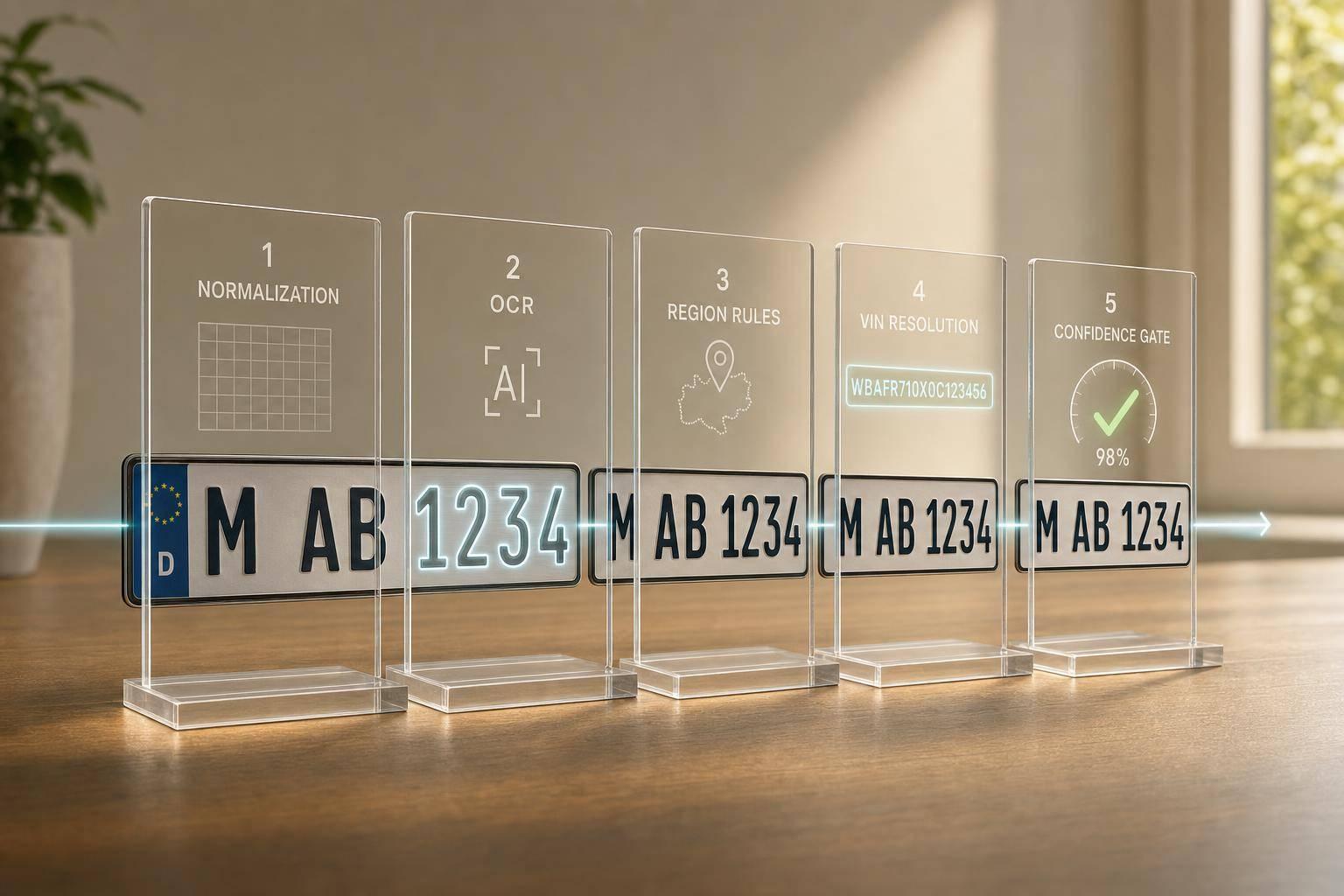
A plate API works by turning messy plate input into clean vehicle data. I start with the answer: the system normalizes the plate, checks the country or state, runs OCR if the input is an image, applies local plate rules, and then returns fields like VIN, make, model, and year.
If you build tools for insurance, parking, fleets, or dealers, this matters because plate rules change by region. A U.S. lookup may need a state code, China may need support for Hanzi characters, and OCR may need to sort out O vs 0 based on local rules. In this case, the article shows one shared flow used across 50+ countries for text decoding and 100+ country/state formats for image recognition.
Here’s the full process in plain English:
- Normalize the input
I clean the plate text, remove spaces or dashes, keep needed local characters, and standardizecountryandstate. - Read the plate from images
If the input is a photo, the API finds the plate, crops it, runs OCR, and returns scored text candidates. - Use region rules
I apply country and state rules to sort out plate patterns, scripts, and lookalike characters. - Match the plate to a record
The clean plate string becomes the lookup key for vehicle records. - Return structured JSON
The API sends back fields such as VIN, make, model, year, and other region-based details. - Gate by confidence
Scores likescore,region.score, anddscorehelp decide whether to auto-accept, review, or reject the result.
A few details stand out:
- Text input works best when the plate string is already known.
- Image input adds OCR and region detection before decode.
- Output fields vary by country. The U.S. may return trim and engine data, while other regions may return registration or owner-linked fields where allowed.
- Errors should stay structured. Good APIs separate “no plate found,” “low OCR confidence,” “bad jurisdiction,” and “no database match.”
If I had to sum it up in one line: multi-format plate decoding is less about reading characters and more about applying the right local rules before lookup.
That’s the core idea behind the article.
How Multi-Format License Plate Decoding Works: 5-Stage API Pipeline
How to do Automatic Number Plate Recognition using Ultralytics YOLO11 and OpenAI GPT-4o-Mini Model 🎉
sbb-itb-9525efd
Step 1: Normalize Multi-Region Inputs Before Decoding
Before decoding starts, the API needs to normalize the plate text, jurisdiction, and image input into one shared schema. That way, it can apply the correct regional rules before it tries to decode anything.
Request Fields for Plate Text, State, Country, and Image Input
For text-based requests, the main fields are plate, country, and state. In many U.S. requests, country is optional and often defaults to US [1]. When you do send country, use an ISO 3166-1 alpha-2 code such as US, CA, AU, GB, or DE [1].
The state field is required for the United States, Canada, and Australia [1]. For U.S. requests, use the correct two-letter state or territory code [1].
For image-based requests, send a POST request with a Content-Type: application/json header. Then pass either image_url or base64 image data. From there, the recognition pipeline extracts the plate text and region code before handing the result to the decoder [2].
Cleaning and Validating Plate Strings by Jurisdiction
Raw plate strings usually aren't neat. People type spaces, dashes, and mixed case all the time. So the normalization step should strip spaces and non-alphanumeric characters, then convert the plate string to uppercase before the request is sent [3].
Validation also needs to match the rules of the jurisdiction. A plate from Brazil like KNX 9595 should become KNX9595. A Chinese plate like 浙G CJ300 should become 浙GCJ300, which keeps the non-Latin character but removes the space [1].
Region Example Raw Input Normalized Plate Key Normalization Step United States plate=7XER-187, state=CA 7XER187 Strip dash; validate 2-letter state code [1] Canada plate=CKST 441, state=ON, country=CA CKST441 Remove space; map province to standard abbreviation [1] Albania plate=AB-404-GM, country=AL AB404GM Strip dashes; confirm ISO alpha-2 country code [1] China plate=浙G CJ300, country=CN 浙GCJ300 Preserve Hanzi character; remove internal space [1] Brazil plate=KNX 9595, country=BR KNX9595 Remove space; no state code required [1]
One more wrinkle: O and 0 can be tricky. The API should handle that based on local plate rules, not guess blindly.
"Some states such as Massachusetts allow the letter O and the number 0 on the same plate while in North Carolina only the number 0 is allowed." - Abe Darwish, CarsXE [3]
With clean input in place, the next step is image detection and OCR for mixed plate formats.
Step 2: Run the Image Recognition Pipeline for Mixed Plate Formats
For image inputs, the API uses a multi-stage pipeline to pull out text that can actually be used. The jurisdiction rules set in Step 1 shape how each stage works. That matters because every stage solves a different problem, and things get messy fast when you account for plate layouts and writing systems across more than 100 countries and states [2].
Plate Detection and Region-Specific Preprocessing
The pipeline begins with a detection model that scans the full image and finds the plate. It marks that area with a bounding box using xmin, ymin, xmax, and ymax [2].
Once the plate region is isolated, the system preprocesses that cropped image before OCR runs. This step is region-specific, so the API can prepare the image based on local plate rules. It also assigns a region confidence score, which helps steer jurisdiction-specific decoding rules later in the flow [2].
Multilingual OCR and Post-Processing with Plate Templates
After preprocessing, the OCR engine reads the plate text. It can process both Latin scripts and non-Latin scripts, including Chinese characters. So a plate from California and a plate from Zhejiang Province don't go through the exact same recognition logic. Each follows its own rules and character set.
OCR isn't perfect, so the API doesn't just return one guess. Instead, it returns a candidates array. Each entry in that array has its own relative confidence score [2].
From there, post-processing clears up ambiguous reads by checking each candidate against region-specific pattern rules. The API picks the candidate that fits the region's plate format. That cleaned text then moves into the decoder, which pulls back the VIN, make, model, and year [2].
Once OCR and post-processing are done, the decoded plate is ready for lookup.
Step 3: Map Decoded Plates to Vehicle Records and API Outputs
After OCR turns the image into a clean plate string, the API applies jurisdiction rules to match that plate to the correct vehicle record. It uses the cleaned text and region code from the previous step. In plain English, the cleaned plate string becomes the lookup key for the vehicle record.
Jurisdiction-Aware Lookup Rules and Plate-to-VIN Resolution
The lookup layer uses jurisdiction-specific rules to resolve a plate to a vehicle record. That matters because vanity plates and special registrations don't always follow standard character patterns. And when characters look similar, the system doesn't rely on guesswork.
For example, Massachusetts allows both "O" and "0", while North Carolina allows only "0" [3]. So the same OCR output can be handled differently depending on the jurisdiction. If a VIN isn't available for a given plate, the API may still return core data such as description, make, model, and registration year [5].
Once the plate is resolved, the API maps that result into the response schema.
Returning Normalized Vehicle Data in a REST Response
The REST response returns structured JSON with VIN, make, model, and year as the base fields. The exact field set can grow or shrink by jurisdiction [1][5].
Jurisdiction Required Parameters Typical Output Fields United States plate, state VIN, Make, Model, Year, Trim, Fuel Type, Engine Size, Drive Type Canada plate, state, country ("CA") VIN, Make, Model, Registration Year, Transmission, Drive Type Australia plate, state, country ("AU") Description, Make, Model, Registration Year United Kingdom plate, country ("GB") Description, Make, Model, Registration Year Brazil plate, country ("BR") VIN, Make, Model, Location, Fuel Type, Color, Power, Axles China plate, country ("CN") VIN, Make, Model, Engine Number, Owner Name/Address (where permitted)
That VIN can then be used for history, recalls, valuation, and spec lookups, so the user doesn't need to type it in by hand [4][5].
Step 4: Improve Accuracy, Handle Errors, and Close the Loop
After decode and lookup, production systems need a confidence gate for lighting, plate style, and jurisdiction errors. At this point, the API has to make a simple call: is this result safe for automation, or does it need a human to check it?
Confidence Scoring, Template Validation, and Template Coverage
Use score to decide whether to accept, review, or reject a result. CarsXE's Plate Image Recognition API also exposes region.score for jurisdiction confidence and dscore for detection confidence, so you can see where things went wrong: plate detection, OCR, or region matching [2]. If the top match looks borderline, check candidates before you accept it [2].
A practical setup looks like this:
- Auto-accept high scores
- Send midrange scores to review
- Ask for a retake when confidence is low [6]
Template validation can push accuracy higher by applying jurisdiction-specific character rules after OCR. That includes rules for ambiguous characters like 0 and O, based on how a given state or country formats plates [3]. Plate templates also need regular updates as jurisdictions change layouts or roll out specialty plates.
Structured Error Responses and Key Implementation Takeaways
After the confidence check, classify failures by source: detection, OCR, jurisdiction, or lookup.
Error Type API Response Pattern Suggested Handling Strategy No Plate Detected results: [] or success: false Verify the image contains a visible plate and check for obstructions or poor framing. Unreadable Image success: false, message: "..." Prompt for a retake with better lighting or a less extreme angle. Low-Confidence OCR score below your threshold, candidates: [...] Route to manual review and show the candidates list for faster selection. Invalid Jurisdiction Missing required jurisdiction fields or low region.score Require the user to manually select the state or country. Plate Not in Database success: true, vehicle fields empty Log the raw string and image; this may indicate a new registration or unsupported format.
Log capture conditions, OCR scores, and error rates by jurisdiction. Then use those logs to tune thresholds and send edge cases to a manual review queue. That's how you spot format drift early, before it starts causing trouble in production.
Conclusion: The Core Flow Behind Multi-Format Plate Decoding
Multi-format plate decoding runs through one clear pipeline. It starts with normalized plate text and jurisdiction codes. From there, each step uses that cleaned input to cut down ambiguity before the final lookup.
For image-based input, the system runs OCR first. It finds the plate, reads the text, and returns scored candidates.
Next, jurisdiction rules sort out lookalike characters. After that, the plate is matched to a vehicle record.
Use score, region.score, and dscore to control automation. High-confidence results can move forward. Borderline cases can go to review. If lookup fails, return a structured error instead of a vague failure. The table below sums up that flow in one place.
In practice, the process comes down to five stages.
Workflow Stage Core Action Key Output Normalization Standardize plate string and jurisdiction codes plate, state, country OCR Pipeline Detect plate, extract text, and score candidates box, candidates, score, region.score, dscore Validation Apply jurisdiction character and format rules Validated plate string Record Resolution Resolve plate to a vehicle record vin, make, model, year Automation Gating Return structured success or error responses success, message
CarsXE uses this same flow across 50+ countries and 100+ plate formats.
FAQs
Why does plate decoding need a state or country?
Plate decoding needs a state or country because vehicle registration systems are separate in each jurisdiction. Plate formats, fonts, designs, and data structures change from one region to another.
When you provide the location, the API can read the plate the right way and check the correct regional database to return accurate vehicle information.
What happens if OCR confidence is low?
When OCR confidence is low, the system returns a confidence score that estimates how closely the recognized characters match the plate shown in the image.
Instead of leaning on a single score by itself, developers should set a confidence policy with clear thresholds for:
- Auto-accept
- Review required
- Reject and recapture
That gives you a more reliable way to handle uncertain reads, especially when image quality drops.
You can also improve results with AI noise reduction, custom detectors, and preprocessing for blurry, low-resolution, or degraded images.
Can the API decode both text and image inputs?
Yes. CarsXE supports both text and image inputs through its API suite.
If you start with an image, use the Plate Image Recognition API to pull the license plate number from the photo. Then send that plate number to the Vehicle Plate Decoder API to get vehicle details like VIN, make, model, and year.
If you already have the plate number as text, you can skip the image step and go straight to the Vehicle Plate Decoder API.
Related Blog Posts
- Study: OCR Accuracy in Vehicle Data Processing
- Ultimate Guide to License Plate Data Interoperability
- Cloud LPR Integration Tips for Developers
- Best Practices for XML License Plate Data Handling