Common VIN OCR Challenges

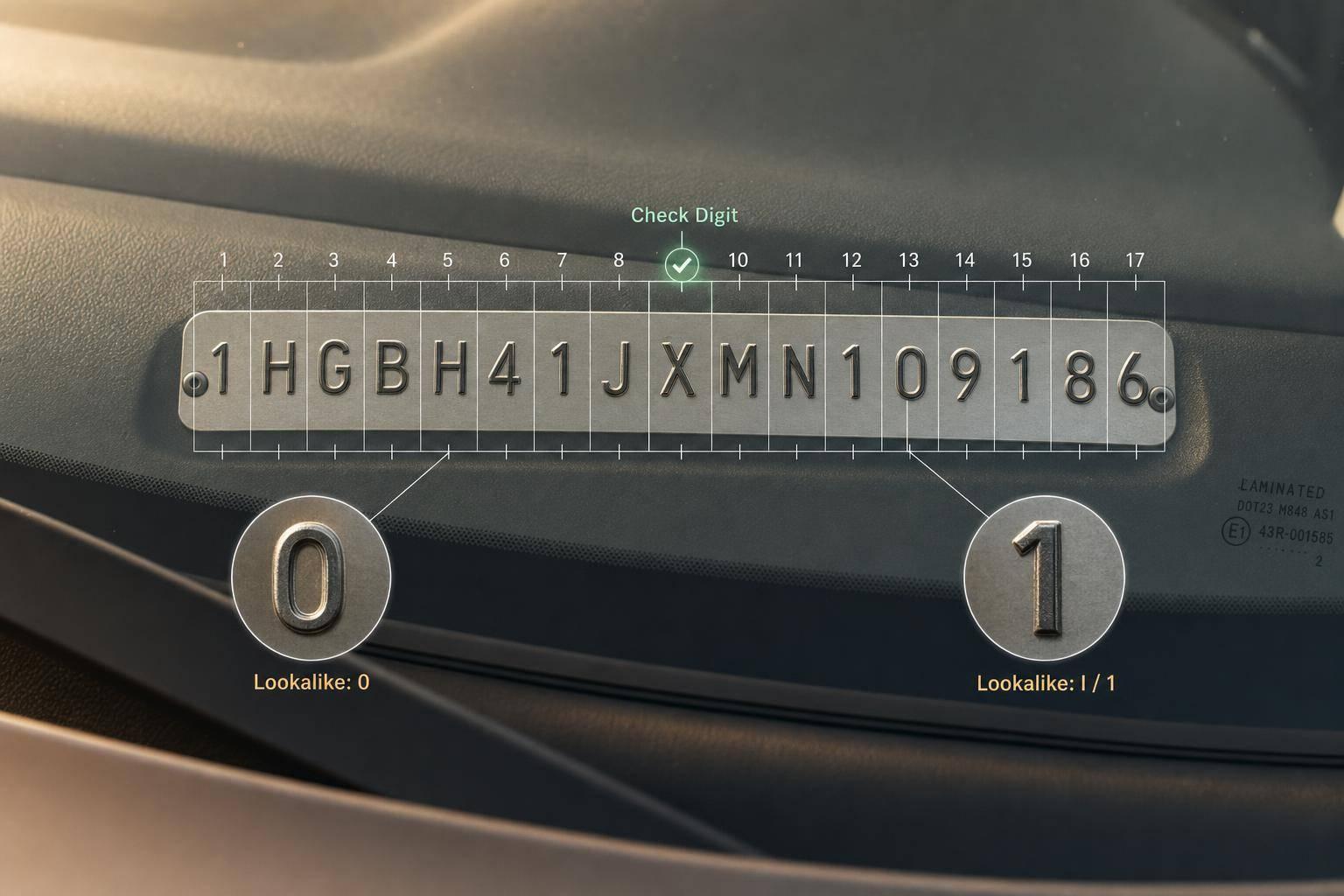
Common VIN OCR Challenges
A VIN OCR workflow usually fails for just 3 reasons: bad image input, lookalike character errors, or weak validation after OCR. And because a VIN has 17 characters, one wrong character can make the whole result useless.
If I had to sum up the article in plain English, it’s this:
- Bad photos break OCR first. Glare on dashboard glass, blur, low light, skewed angles, and over-zoomed mobile shots make the VIN hard to read.
- Even clean images can still fail. OCR often mixes up pairs like
8/B,5/S, and0/O. And if it returnsI,O, orQ, that output should be flagged at once because those letters do not belong in a standard VIN. - Validation is the last gate. I’d normalize the OCR text, check for 17 characters, reject illegal letters, and run the 9th-character check digit before sending anything into claims, service, inventory, or compliance systems.
- Accuracy math can be misleading. Even 98%–99% OCR accuracy can still leave about 1 in 50 VINs unusable, which can lead to bad lookups, duplicate records, failed parts orders, and extra manual work.
- The safest flow is simple. Improve the photo, use VIN-aware OCR rules, then verify the result against decoded vehicle data before it reaches production systems.
The main point: VIN OCR is not just about reading text. It’s about stopping bad VINs before they trigger the wrong vehicle record, the wrong claim, or the wrong price.
This article walks through those 3 failure points - and the fixes I’d use to cut bad reads before they turn into downstream problems.
How to read a VIN with our AI-powered OCR
sbb-itb-9525efd
Challenge 1: Poor Image Quality and Difficult Capture Conditions
Poor images are one of the main reasons VIN OCR fails before decoding even begins. In service bays, outdoor dealer lots, and customer mobile uploads, the camera often picks up glare, blur, or a skewed angle instead of a clean VIN. That first step matters a lot. If the capture is bad, the recognition layer doesn't have much to work with. Once the image is clean, the next set of problems usually comes from lookalike characters.
Blur, Low Resolution, and Compression Artifacts
Motion blur shows up all the time in indoor service bays. Someone leans over a vehicle, takes a quick photo in a dim lane, and a small hand movement softens the edges just enough to make characters run together. A short hold before capture can help. So can on-device blur detection that asks for a retake when the image is too soft.
Compression and digital zoom also chip away at character detail. Heavy JPEG compression in mobile uploads can add artifacts that make pairs like 8 and B or 5 and S much harder to tell apart. The better move is simple: get the phone closer instead of relying on digital zoom.
Glare, Low Light, and Skewed Angles
Sun glare on dashboard glass can wash out part of the VIN or the whole thing. Sometimes the fix is as basic as stepping a little left or right so the reflection changes. In indoor service bays or nighttime lot captures, turning on the flash when low light is detected can cut shadows and make the text stand out more.
Skewed angles create another problem. When the shot comes from the side, character shapes get stretched or compressed, and OCR can read the sequence wrong. On-screen framing guides help users line up the shot and keep the full VIN in view.
Comparison Table: Common Capture Problems and Fixes
Image Problem Common Cause Effect on OCR Accuracy Recommended Fix Blur Hand movement in dim service bays Soft edges; characters merge or disappear Stabilize; retake Glare Sun or overhead lights reflecting off glass Characters washed out or partially invisible Shift angle Low Light Indoor service lanes or nighttime outdoor lots Low contrast; text blends into background Enable flash Skew Angled shots from the side of the vehicle Distorted character proportions Widen framing guides Poor Framing User zooming in too close or poor framing First or last characters cut off Wider capture box; show a visible margin Compression Artifacts Aggressive JPEG compression or digital zoom Characters merge; fine details are lost Move closer
Even a sharp image can still fail when OCR mixes up similar VIN characters.
Challenge 2: Character Confusion and VIN Recognition Errors
Even when the image looks good, OCR can still get the VIN wrong. At that point, the problem isn’t the photo anymore. It’s the recognition step.
VINs are tough because some characters look almost the same, especially on dot-matrix or embossed vehicle labels. So once the image is readable, the next weak spot is simple: character confusion.
Ambiguous Characters, Missing Characters, and Damaged Labels
Generic OCR often mixes up VIN lookalikes like 0 and O, 8 and B, 5 and S, or 1 and I [6]. That problem gets worse on automotive labels, where the fonts don’t look like clean document text.
There’s also the issue of damage. Dirt, scratches, faded print, or a sticker that’s partly covered can wipe out one or more characters. And that’s all it takes to make a VIN fail. VINs do not allow I, O, or Q because they can be confused with 1 and 0 [2][1]. Generic OCR doesn’t enforce that rule on its own, so bad output can slip through without anyone noticing. One wrong character can break lookup, decoding, and verification.
VIN-Aware OCR Logic vs. Generic Text Recognition
The fix starts after recognition. Check the OCR output against VIN rules before you accept it. If the result includes I, O, or Q, flag it right away [2][1]. The output should also be exactly 17 characters, with all letters converted to uppercase and any spaces or hyphens removed [1].
A VIN-aware pipeline can go further. It can use the 9th character as a check digit to catch strings that look fine at a glance but still fail validation [6][1]. That matters because some OCR mistakes don’t stand out until they hit a downstream system.
Confidence scores help too. Low-certainty reads can be sent to manual review instead of being passed along as if nothing happened. Some setups also detect each character on its own, which can help when the plate or label is damaged [2].
After OCR finishes, the VIN still needs one more gate: validation before it enters production systems.
Comparison Table: Generic OCR vs. VIN-Aware OCR
Feature Generic OCR VIN-Aware OCR Ambiguous Characters May output O, I, or Q without flagging them Filters out I, O, and Q based on VIN rules 17-Character Validation Reads any length of text found Enforces a strict 17-character length rule Error Detection No internal validation; silent failures are common Uses the 9th-character check digit to detect invalid strings Font Support Optimized for standard document fonts Better suited to dot-matrix and embossed automotive fonts Implementation Complexity Low - plug-and-play Moderate - requires validation logic or fine-tuning
Challenge 3: Validating OCR Output Before It Reaches Production Systems
A VIN that passes character recognition still isn't automatically correct. OCR output needs validation before it touches pricing, claims, service, or compliance systems. One wrong character can throw off everything that happens next [3].
Length Rules, Allowed Characters, and Checksum Validation
Once OCR returns a string, validation becomes the last gate before the VIN moves into downstream systems. Start with normalization and basic VIN format checks. Then apply VIN-specific rules.
After that, run the VIN check-digit validation. This step catches approximately 95% of transcription errors before any database lookup happens, including around 90.9% of single-digit substitutions and 98–99% of character transpositions [8]. That matters because it stops a bad read before it reaches claims, intake, or compliance systems.
A checksum failure shouldn't be treated like the end of the road. It should be routed based on context. A result with high OCR confidence but a failed checksum is a strong case for manual review. A low-confidence read that also fails the checksum should trigger an automatic re-capture prompt in mobile workflows, so the user can retake the photo before bad data moves downstream [1][7].
Reject strings that fail pattern checks before they reach production. These checks cut down on bad reads, but production pipelines still need one last verification layer.
Using CarsXE to Verify and Enrich OCR Results
When structure checks pass, the next step is making sure the VIN maps to an actual vehicle. After a VIN clears structural validation, use CarsXE to verify it against decoded vehicle data and enrich it with specs, history, recalls, value, and images.
You can also cross-check the decoded output against other fields in the document. For example, if the 10th character conflicts with the paperwork's model year, flag it before the record enters a CRM or DMS [1].
The table below shows what each validation layer adds.
Comparison Table: Basic Validation vs. Checksum vs. API-Based Verification
Validation Method Errors It Catches Implementation Effort Value for U.S. Workflows Basic Format Rules Wrong length, illegal characters (I, O, Q), non-alphanumeric noise Low Must-have; catches obvious garbage reads Checksum (Modulo 11) Single-digit substitutions, character transpositions (e.g., B vs. 8, 5 vs. S) Medium High; catches approximately 95% of transcription errors WMI and model-year check Impossible WMIs, model year mismatches with document text Medium High; stops valid-looking VINs from being tied to the wrong vehicle API-Based (CarsXE) VINs valid in format but tied to the wrong vehicle, mismatched vehicle data, history, or recall status High (requires integration) Top level; provides vehicle data, history, recalls, and market value in USD
With capture, recognition, and validation in place, the workflow can move into a more reliable end-to-end process.
Building a More Reliable VIN OCR Pipeline
VIN OCR Pipeline: 3 Failure Points & Fixes
A Practical End-to-End Flow for Developers and Auto Businesses
The three failure points line up with three parts of the pipeline: capture, recognition, and validation. If you fix just one, problems still slip through.
Here’s how those issues map to a practical flow:
Pipeline Stage Key Actions Why It Matters Capture On-screen framing overlays, tap-to-focus on the VIN plate, avoid digital zoom Prevents blur, glare, and cropping errors before OCR even runs [4] Pre-processing Deskewing, perspective correction, contrast adjustment, sharpening Cleans up the image so the OCR engine gets better input [3][5] Extraction VIN-specific AI models trained on dot-matrix and embossed fonts Handles character spacing and shapes that generic OCR often gets wrong [2][5] Validation Normalize to uppercase, trim spaces, check 17-character length, reject I/O/Q, run checksum Stops structural errors before the VIN reaches downstream systems [1][9] Routing Auto-accept on high confidence and a valid checksum, manual review on moderate confidence, recapture on failure Keeps bad VINs out of production without blocking good ones [10] VIN/API Verification Decode with CarsXE and cross-check vehicle data against document fields Adds one more verification step and fills the record with decoded vehicle details [1]
Once this flow is set up, exception handling needs a simple rule. Low confidence plus a checksum failure should trigger an immediate recapture prompt. If the checksum runs locally on the device before any backend call, users get instant feedback and can retake the photo right away [6].
It also helps to review capture results every month. If retake rates or manual correction rates keep showing the same patterns for certain device types or lighting conditions, the issue is usually with capture conditions, not the OCR engine itself [4][3].
Conclusion: The Main Causes of VIN OCR Failure and the Most Effective Fixes
Reliable VIN OCR comes down to three layers: better capture, VIN-aware recognition, and multi-step validation.
After a VIN passes structural validation, checking it against decoded vehicle data through CarsXE adds the last layer. That’s the difference between a pipeline that works most of the time and one that can handle production use.
FAQs
Why is one wrong VIN character such a big problem?
A single incorrect character is a critical failure because a VIN is a precise 17-character identifier tied to one specific vehicle.
So even if most of the VIN is right, one wrong or missing character can make it invalid for verification, claims, inventory, and intake systems. Once that happens, downstream workflows can break fast, because the system can’t accurately match the vehicle to its specs or history.
When should a VIN photo be retaken instead of reviewed manually?
Retake the VIN photo when the image is severely degraded instead of sending it to manual review.
Ask for a new image if the VIN is partly blocked, skewed, too far from the camera, blurred, framed badly, or washed out by glare. A retake during capture is more efficient than manual entry or fixing errors after the scan fails.
How does VIN verification help after OCR passes?
After OCR pulls text from an image, verification works like a quality check. The goal is simple: make sure the VIN can actually be used.
OCR can return strings that look right but are still wrong, especially when glare, blur, or poor lighting gets in the way. Verification checks the result before it moves into downstream systems.
It usually reviews a few things:
- The VIN checksum
- The VIN length
- The allowed character set
- Segment patterns
If one of those checks fails, the system can try again, ask for a new image, or send the case for manual review.
Related Blog Posts
- How to Choose an OCR Engine for Vehicle Data
- Study: OCR Accuracy in Vehicle Data Processing
- Ultimate Guide to OCR Pipeline Monitoring
- Mobile OCR for VIN Decoding: Key Features to Look For